
The Klowra Verdict Poly Octave is a polyphonic octave pedal that goes beyond the typical octave effect in some interesting ways.
In this review, I’ll give a thorough look at the Verdict’s unique features and how you can get the most out of the pedal.
Learn more about Octave and Pitch-Shifting effects in my comprehensive Guitar Effects Course here.
Klowra Verdict Poly Octave Pedal Features
Here are the main features of the Verdict Poly Octave pedal:
- Four Independent Octave Voices (+1 OCT, +2 OCT, -1 OCT, and -2 OCT with individual level controls)
- Knobs for Swell and Low-Pass Filter Cutoff
- Freeze and Ramp Functions
- Six Hidden Parameters (Detune, RampATK, RampRLS, -2 OCT, Low Cut, and Q)
- External Control Input (TRS dual footswitch or TRS expression pedal)
- Separate Effect and Analog Dry-Out outputs
- Switchable True Bypass or Buffered Bypass with trails
- Multi-Function LED Button
- 24-bit AD/DA conversion and 32-bit DSP floating-point processing
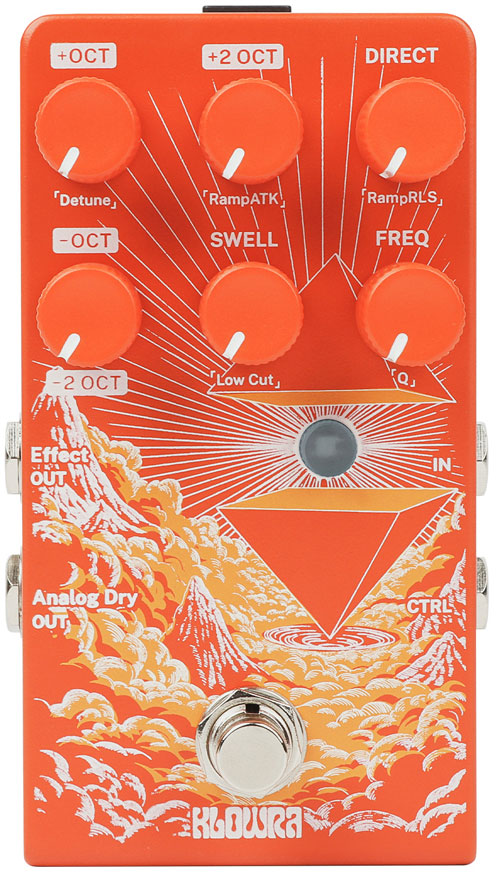
The Verdict does not include a power supply, so you’ll need to provide your own 9V DC center-negative adapter with at least 250mA of current.
Check out the current price and full details of the Klowra Verdict Pedal here (link to Amazon).
Klowra Verdict Poly Octave Pedal Ease of Use
The Verdict has a steeper learning curve than most octave pedals, primarily due to different power-up modes, hidden parameters, the multi-function footswitch, and external control capability. However, once you get used to setting up these different abilities, you can customize your pedal to produce some great octave effects.
Understanding the Control Layout
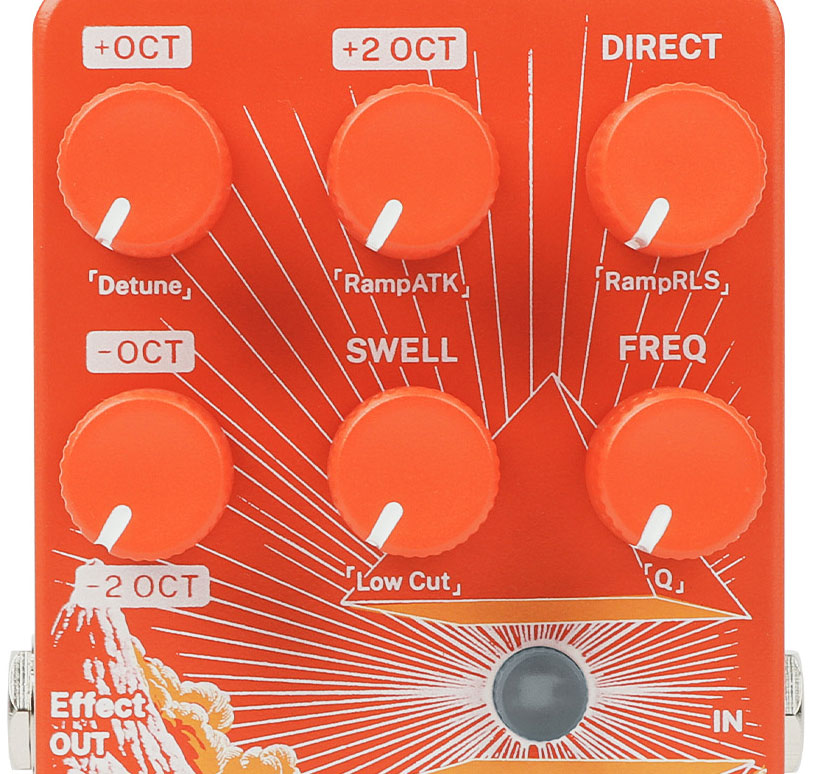
The pedal features six knobs, a footswitch, and an LED button:
+OCT – Controls the level of the +1 octave voice (one octave above your input signal). Turn clockwise to increase, counterclockwise to decrease.
+2 OCT – Controls the level of the +2 octave voice (two octaves above your input signal). Turn clockwise to increase, counterclockwise to decrease.
-OCT – Controls the overall level of the lower octave voices. This works in combination with the hidden -2 OCT parameter to set the balance between -1 and -2 octave voices.
DIRECT – Adjusts the level of your dry signal. This is used to blend your original tone with the octave voices or to hide your original tone (eg: if you want to emulate a bass guitar).
SWELL – Controls the attack time of the effect. Higher settings create slower, pad-like or violin-style swells, while lower settings respond more immediately. When Envelope Filter mode is enabled (via Power-Up Mode), this also affects the filter sweep.
FREQ – Adjusts the low-pass filter cutoff frequency, shaping the brightness of the effect. Lower settings produce darker, mellow octave tones, while higher settings sound brighter.
The LED Button System
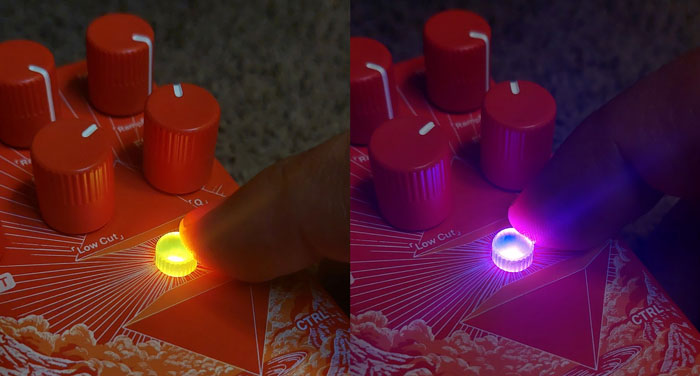
The LED button uses different colors to indicate the pedal’s current state:
- White: Freeze function is active
- Blue: Freeze is currently being triggered
- Orange: Ramp function is active
- Violet: Ramp is currently being triggered
The LED button serves multiple functions:
- Single press: Toggle between Freeze mode (LED white) and Ramp mode (LED orange)
- Press and hold: Save current parameter settings as Snap-Set for Ramp function (LED blinks violet to confirm)
- Press and hold while turning knobs: Access hidden parameters (LED blinks yellow to confirm adjustment)
Understanding this LED color system is essential. You need to know which mode you’re in (Freeze or Ramp) before using the footswitch for advanced functions. If you use an external expression pedal or footswitch, the LED will let you know what function the control is using (eg: LED turns blue during freeze).
Accessing Hidden Parameters
The Verdict includes six hidden parameters that provide additional control over your sound. To adjust these, press and hold the LED button while turning the corresponding knob. A yellow LED blink confirms successful adjustment.
Detune (accessed via +OCT knob) – Adds detuning to the effect voices for a wider, chorus or synth-like character. Higher settings increase width, lower settings maintain tightness.
RampATK (accessed via +2 OCT knob) – Controls the attack time of the Ramp function, determining how quickly the effect transitions to your saved Snap-Set.
RampRLS (accessed via DIRECT knob) – Controls the release time of the Ramp function, determining how gradually the effect returns to your panel settings.
-2 OCT (accessed via -OCT knob) – Adjusts the -2 octave level as a ratio of the -1 octave level, allowing you to dial in subtle low foundation or stronger sub-octave weight.
Low Cut (accessed via SWELL knob) – Sets the low-cut frequency for the octave effect, reducing boom and muddiness at higher settings while preserving low-end weight at lower settings.
Q (accessed via FREQ knob) – Adjusts the resonance of the low-pass filter. Higher Q values emphasize the cutoff point, while lower Q provides a smoother, more natural roll-off.
This might sound like a lot to remember, but it’s pretty simple. You look at the labels below each knob to see what the parameters are, then turn that knob to change that parameter while holding the LED button.
For example: if you want to add a -2 Octave to the effect, hold down the LED button and turn the -OCT knob to dial in the -2 octave.
Configuring Power-Up Modes
The Verdict includes Power-Up Modes that allows you to set up different effects and features. To access Power-Up Modes, disconnect the pedal from power, press and hold the footswitch, then plug the pedal back in. A flashing LED confirms you’ve entered the Power-Up Mode.
Once in Power-Up Mode, you can adjust the following settings:
Bypass & Trails Modes (toggle with LED button short press):
- True Bypass (LED flashes green): Signal routes directly through with no buffering
- Buffered Bypass with Trails On (LED flashes red): Signal routes through a buffer with Analog Dry-Through, allowing effect trails to continue after bypass
Freeze Release Switching (adjust with +OCT knob):
- Fully left: Fast Release (LED flashes yellow 3x) – Frozen sound stops quickly
- Fully right: Slow Release (LED flashes blue 3x) – Frozen sound fades gradually
Ramp Lock (adjust with +2 OCT knob):
- Fully left: Momentary (LED flashes yellow 3x) – Hold footswitch to activate
- Fully right: Latched (LED flashes blue 3x) – Toggle on/off with footswitch presses
Dry Path Mode (adjust with DIRECT knob):
- Fully left: Analog Dry-Through (LED flashes yellow 3x) – Dry signal stays analog at Effect OUT
- Fully right: Processed Dry (LED flashes blue 3x) – Dry signal goes through SWELL and FILTER
Freeze Lock (adjust with -OCT knob):
- Fully left: Momentary (LED flashes yellow 3x) – Hold footswitch to freeze
- Fully right: Latched (LED flashes blue 3x) – Toggle freeze on/off
Envelope Filter (adjust with SWELL knob):
- Fully left: Envelope Filter off
- Fully right: Envelope Filter on – Links filter cutoff to swell envelope for dynamic filter sweeps
LED Brightness (adjust with FREQ knob):
- Fully left: Dimmest
- Fully right: Brightest
After making your adjustments, short-press the footswitch to exit Power-Up Mode and save your settings.
These Power-Up Mode options give you significant control over how the pedal behaves. You can tweak and customize your pedal to suit your playing style and once you have the right modes set up, you probably won’t need to change them again.
I really like that you can customize the pedal like this, but it is a very hidden feature that isn’t obvious at all when you look at the pedal. If you never read the manual (or read through a review like this), you’ll never know you can do any of these things and you’ll miss out.
For example, I love using the Freeze and Ramp effects using an external dual footswitch. But I didn’t like that the effects were set to momentary mode (only active while you hold down the footswitch). With the Power-Up Modes, I was easily able to change this so both Freeze and Ramp were set to Latched mode. So when I tap the footswitch for the Freeze effect, it remains active until I tap it again.
If you buy the Verdict, take some time going through these Power-Up Modes to customize your pedal to your liking. If you want to change them in the future, you’ll need to look up the manual (or this review) to remember which knob controls which setting.
Basic Operation
As with most pitch-based effects, you will get the best results by placing the Verdict first in your effects chain. In other words, the Verdict works best when you use a clean, dry tone. Other effects before the Verdict may interfere with its pitch-shifting performance.
At its core, the Verdict functions as a straightforward polyphonic octave pedal. Set your desired octave levels using the DIRECT, +OCT, +2 OCT, and -OCT knobs (with -2 OCT as a hidden parameter), and you’ll get a traditional octave effect.
The Verdict is a polyphonic pedal, which means it can pitch-shift more than one note at a time. So you can strum chords, and the entire chord will pitch-shift up or down based on your settings. The tracking is impressive and shows how far pitch-shifting pedals have come over the years.
The independent control over four octave voices (+1, +2, -1, -2) gives you plenty of flexibility. You can create everything from subtle octave doubling to massive, organ-like tones with all voices stacked together. The -2 OCT hidden parameter is particularly useful for fine-tuning your low end – you can add just a hint of sub-octave for thickness or crank it up for dramatic bass-heavy sounds.
It’s a shame that the -2 Octave doesn’t have a dedicated knob like on other pedals. You just need to remember to hold down the LED button to be able to adjust that octave.
The main footswitch toggles the effect on/off with a short press.
Press and hold the footswitch when the LED is white to activate Freeze (looks purple in the below photo), or when the LED is orange to activate Ramp.
Using the Freeze Function
I was excited to hear that Freeze was an effect on the Verdict. Freeze is a way to capture and hold a sound and keep it ringing out while you continue to play. It’s very commonly used in ambient-style playing as you can create lush backgrounds to solo over.
Freeze mode is ready when the LED is white. If the LED is orange, press the LED button to change it to white.
When Freeze is activated (the LED will turn blue), the pedal will capture your current sound and sustain it indefinitely, like an organ sustain pedal.
This creates a continuous pad or drone underneath your playing. You can freeze a chord, then solo over it. You can freeze a single note and build harmonies on top. The frozen layer continues until you release the footswitch.
In Power-Up Mode, you can choose between Fast Release (frozen sound stops quickly) and Slow Release (frozen sound fades gradually). You can also switch between Momentary mode (effect active only while holding the footswitch) and Latched mode (toggle on/off with footswitch presses).
You can also connect an external footswitch to trigger Freeze mode, which is handy if you also want to be able to use the Ramp feature.
Using the Ramp Function
Ramp might be the Verdict’s most unique feature and while it may be confusing to set up at first, it sounds great when dialed in.
The idea with Ramp is that it allows you to smoothly transition between two different parameter settings: your Panel-Set (current knob positions) and a saved “Snap-Set”.
So to use Ramp, you first need to set up a Snap-Set sound, or else the Ramp has nothing to transition to and you won’t hear any change in effect (as I found out the first time I tried to use Ramp).
To use Ramp:
- Toggle the LED button to orange (Ramp mode active)
- Set your knobs to your desired “destination” sound
- Press and hold the LED button to save this as your Snap-Set (LED blinks violet to confirm)
- Adjust your knobs to your “starting” sound (Panel-Set)
- Press and hold the footswitch to transition from Panel-Set to Snap-Set
The transition speed is controlled by the hidden RampATK parameter (ATK: attack time). Release the footswitch, and the effect returns to Panel-Set over the time set by RampRLS (RLS: release time).
You can also set Ramp to Latched mode in Power-Up Mode, where the first footswitch press transitions to Snap-Set, and the second press returns to Panel-Set.
As a simple example of how this sounds, imagine the Snap-Set sound is a -OCT signal with everything else turned off (to mimic a bass guitar). Once you save that as the Snap-Set, you set the Panel-Set sound to only play your DIRECT sound. When you hold down the footswitch, your original sound will fade out and the -OCT sound will fade in based on your RampATK setting. You can switch back and forth between the bass and guitar sounds by holding the footswitch.
Being able to morph between any two sounds gives you so much freedom and creative space to play with. You can fade in and out of organ-like sounds or rapidly morph between an aggressively heavy and low sound and your regular sound. It’s a lot of fun to play with and places Verdict far above typical octave pedals.
External Control with Dual Footswitch
The Verdict’s CTRL input accepts either a TRS dual footswitch or a TRS expression pedal, significantly expanding the pedal’s performance capabilities.
When you connect an external device, the LED flashes red. You need to trigger the footswitch or move the expression pedal several times during this state for the Verdict to recognize the device. Once recognized, the pedal returns to normal operation.
For this review, I tested the Verdict with the Klowra Animus Dual Footswitch, which provides two momentary switches for controlling Freeze and Ramp functions.
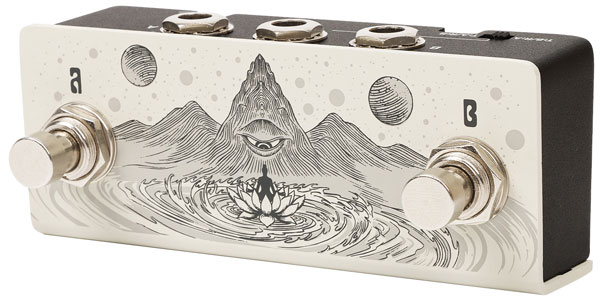
This means instead of only being able to use either Freeze or Ramp using the pedal’s footswitch, I now have dedicated footswitches for both effects at the same time (I set my footswitches to latching mode as explained earlier).
The functionality depends on which LED mode is active:
When LED is White (Freeze mode active):
- Tip switch: Momentary triggers Ramp
- Ring switch: Momentary triggers Freeze
When LED is Orange (Ramp mode active):
- Tip switch: Momentary triggers Ramp
- Ring switch: Momentary triggers Freeze
This dual footswitch setup would be very handy for live performance. You can instantly freeze a chord with one switch while simultaneously ramping to a different tone with the other. Or freeze a sustained pad, then use Ramp to morph that frozen texture into something completely different.
The ability to trigger both Freeze and Ramp without needing to press and hold the main footswitch makes the Verdict far more performance-friendly. You can focus on playing rather than footswitch gymnastics.
External Control with Expression Pedal
While I didn’t test the Verdict with an expression pedal, it offers a different approach to Ramp control. When an expression pedal is connected:
- The pedal directly controls the blend between Panel-Set and Snap-Set
- RampATK and RampRLS parameters are disabled (since you’re manually controlling the transition)
- Ramp cannot be triggered by the footswitch
- The pedal locks into LED White (Freeze mode), and you cannot switch to LED Orange
This makes the expression pedal ideal for gradual, manual morphing between tones, while the footswitch approach works better for triggered, automatic transitions.
Output Configuration
The Verdict features two output jacks on the rear panel:
Effect OUT – Outputs a blend of the dry and wet signals, determined by the DIRECT and Octave controls. In Analog Dry-Through mode (set in Power-Up Mode), the dry signal stays analog. In Processed Dry mode, the dry signal goes through SWELL and FILTER before mixing.
Analog Dry-Out – Always outputs the direct dry signal only, regardless of other settings. It does not pass through any effect processing.
This dual-output configuration is particularly useful for complex rigs. You can send the effected signal to one amp while keeping a clean signal going to another, or use the Analog Dry-Out as a consistent signal for other always-on pedals.
Klowra Verdict Poly Octave Pedal Sound Quality
In the past, pitch-based effects were very hit-or-miss. A simple +1 or -1 octave effect would sound fine, but anything further out in pitch would sound horribly digital and fake. Some pitch-based pedals today still sound quite artificial.
The Verdirect gets pitch right. It sounds fantastic and even the +2 and -2 octaves sound great. When you mix in all four pitches (plus the direct signal), you end up with a lush wall out sound with evenly triggered sounds, not an artificial mess that pop in and out unevenly.
I’m very impressed with how good the Verdict sounds, especially when combined with the Ramp and Freeze effects. Even the Envelope Filter (covered below) works very well.
This high sound quality is thanks to Klowra’s “WildSeed Engine”. It uses 24-bit AD/DA conversion and 32-bit DSP floating-point processing.
The pedal supports Analog Dry-Through, meaning your dry signal never converts to digital (unless you select Processed Dry mode in Power-Up Mode). This preserves your original tone while blending in the digitally processed octave voices. So if you’re concerned about a digital pedal altering your original tone, you can adjust the pedal to keep your analog signal intact.
Creating Synth-Like Swells and Textures
The combination of SWELL and FREQ controls moves the Verdict beyond basic octave sounds into synthesizer territory.
SWELL controls the attack time of your notes. At minimum settings, notes respond immediately with full volume. As you increase SWELL, notes fade in gradually, creating violin-like or pad-like swells. This is particularly effective for ambient playing or creating smooth, non-percussive textures.
FREQ shapes the brightness through a low-pass filter. Lower settings create dark, muted tones reminiscent of vintage synths or mellow organ sounds. Higher settings keep things bright and clear. The hidden Q parameter adds resonance to this filter – higher Q values create a more pronounced peak at the cutoff frequency, adding character and emphasis to filter sweeps.
When you enable Envelope Filter mode in Power-Up Mode, the filter cutoff responds to your SWELL envelope. Slow swells produce matching filter sweeps, creating dynamic, auto-wah-like effects that respond to your playing dynamics.
The Detune hidden parameter is crucial for synth-like sounds. Higher detuning adds width and a chorused character that makes the effect sound less like a guitar and more like a polyphonic synthesizer. Combined with all four octave voices, high SWELL settings, and careful filter adjustment, you can achieve convincing synth pads and leads.
Organ-Like Tones
With all four octave voices engaged and careful attention to the FREQ and Q settings, you can achieve convincing organ-like tones. I had the most fun experimenting with organ-like tones and morphing them using the Ramp effect.
Use Freeze for sustain, and you have a powerful organ simulation that responds to your playing dynamics. The ability to freeze a chord and let it sustain while you play over it is particularly organ-like.
Dynamic Performance with Freeze and Ramp
Freeze and Ramp are the main features that you’ll likely use the most. Here are some examples of what you can do with them:
Freeze for ambient pads: Capture a chord and sustain it underneath your playing. You can build complex harmonic layers in real-time without a looper. The frozen texture continues indefinitely, creating drone-based soundscapes or ambient backgrounds.
Morph between two sounds: Smoothly morph between drastically different sounds. For example, you could set your Panel-Set for a clean bass doubling sound (mostly -OCT with minimal SWELL), save a Snap-Set with high SWELL, lots of Detune, and all octaves stacked for a massive synth pad, then use Ramp to smoothly transition between the two for dramatic dynamic shifts.
Combined Freeze and Ramp: With an external dual footswitch like the Klowra Animus, you can freeze a sustained pad, then use Ramp to morph that frozen texture into something completely different.
Simulate Feedback: One thing I really liked during experimenting was to save a Snap-Set using +1 and +2 octaves, then leave the main effect as only the direct sound. Then use the ramp to slowly fade in (using RampATK) the higher octaves. When used with a high-gain tone, this sounds similar to amp feedback. Being able to add in ‘feedback’ to your solos at any point feels great.
Comparison to Other Octave Pedals
While many octave pedals can simulate bass guitars or double your lead lines, the Verdict offers capabilities that extend far beyond traditional octave effects.
Most octave pedals, including affordable options like the FLAMMA FS-08 (which I’ve reviewed here), focus purely on pitch-shifting with basic controls for octave levels and sometimes a simple filter. The Verdict adds features that give you a lot of creative room to experiment. Yes, you can do a simple octave effect with the Verdict, but you can also do a lot more.
The EHX POG2 and POG3 offer multiple octave voices and filter controls similar to the Verdict, but lack dedicated Freeze and Ramp functions. While the POG series excels at organ emulation and offers presets (POG3), the Verdict’s dynamic performance features make it better suited for evolving, experimental sounds and real-time manipulation.
Overall Impressions of the Klowra Verdict Poly Octave Pedal
The Klowra Verdict Poly Octave does a great job as an octave pedal, and it does far more than a typical octave pedal if you want something a bit extra to play with.
The build quality is excellent and the knobs feel sturdy. The LED button works well and I really like the color-coding between the different effects and modes.
Compared to a typical octave pedal, there is a lot more to learn if you want to get the most out of the Verdict. The LED button system, hidden parameters, and Power-Up Mode configuration aren’t obvious at first. Most of the features are quick and easy to learn, and more complicated options such as the Power-Up Modes likely only need to be set once.
The external control options, particularly with a dual footswitch like the Klowra Animus that I used, make the Verdict a great live performance pedal. The ability to trigger Freeze and Ramp independently without tap dancing on footswitches or having to bend over to change modes is a significant advantage for live use.
The Verdict is now my go-to octave pedal, and I’m really enjoying how the Freeze and Ramp gives you so much flexibility compared to typical octave pedals. I highly recommend the Verdict and am very interested to try out more Klowra pedals if they’re as good as this one is.
Klowra Verdict Poly Octave Pedal Pros and Cons
Pros
- Great value
- Four independent octave voices
- Freeze and Ramp functions
- External control via dual footswitch or expression pedal
- Very customizable with Power-Up Modes
Cons
- Steep learning curve due to LED button system and hidden parameters
- Power-Up Mode configuration isn’t clear without the manual
- Only stores one Snap-Set at a time (no preset system for multiple saved settings)
- No power supply included
Check out the current price and full details of the Klowra Verdict Pedal here (link to Amazon).
Who is the Klowra Verdict Poly Octave Pedal For
The Verdict is ideal for:
Ambient and Experimental Players: If you like the idea of creating soundscapes, drones, or textural music, the Freeze and Ramp functions are perfect for building complex, evolving layers in real-time. I spent a lot of time jamming with the Verdict and combining it with other effects such as delay, reverb, modulation, and different drive effects. I had a lot of fun recording progressions on a looper using the Verdict and jamming over the top.
Players Seeking Synth-Like Tones: Guitarists and bassists who want to explore synth-like sounds without having to buy a dedicated synth-style pedal (eg: the EHX B9 Organ Machine) may enjoy the simple tones the Verdict can produce.
Players Who Use Octave Effects: while pedals like the EHX POG3 may be the go-to octave pedal for a lot of players, I feel the Verdict offers something most octave pedals lack. The ability to morph between different settings or freeze the sound truly adds something unique to the Verdict and it’s something I really enjoy using. If you already have a simple octave pedal, this might be a good upgrade to consider.
How to Get the Most Out of the Klowra Verdict Poly Octave Pedal
Here are some tips to help you get started using the Verdict if you choose to buy it:
Start Simple
Don’t try to master every feature immediately. I felt a bit overwhelmed at first because I immediately tried to dig into all the hidden features such as the Envelope Filter. Begin by using the Verdict as a straightforward octave pedal – set your octave levels, adjust DIRECT to blend it with your original tone, and get comfortable with the basic sound.
Once you’re familiar with the core operation, start exploring SWELL and FREQ controls (eg: try to create a violin-style sound), then gradually incorporate Freeze. Leave Ramp to last as you should feel very comfortable with setting up different sounds to get the most out of Ramp.
Experiment with Hidden Parameters
The hidden parameters significantly expand your tonal palette. Detune is particularly important for synth-like sounds, while Q adds character to filter sweeps. The -2 OCT parameter is crucial for bass effects. Set aside time to explore each hidden parameter and understand how it affects your sound.
Write Down Your Snap-Sets
The Ramp function is only as useful as your saved Snap-Sets. Experiment with saving drastically different sounds – for example, a clean octave-up setting as your Panel-Set and a heavily detuned, swelled synth pad as your Snap-Set. The more contrast between your two settings, the more dramatic and useful the Ramp transitions become.
Whenever you come up with an interesting sound, write down each knob’s position on paper or on a note-taking app. Write down the settings as well as a description on what the effect sounds like. Over time, you’ll end up with a nice collection of sounds you can set up with the Ramp. The Verdict doesn’t save multiple presets, so write down anything you come up with that you might want to use again in the future.
Use External Control for Performance
If you’re using the Verdict in live performance, invest in an external dual footswitch like the Klowra Animus. Being able to trigger Freeze and Ramp independently gives you more options on how you can use the pedal on stage. Practice triggering both functions simultaneously to create complex, evolving textures.
Alternatively, if you have an external expression pedal, try using it to smoothly morph between different sounds.
Configure Power-Up Mode to Match Your Style
Take time to customize your pedal using the Power-Up Mode settings. If you want instant control, set Freeze and Ramp to Momentary. If you prefer hands-free operation, use Latched mode. Experiment with Fast vs. Slow Freeze Release to find what works best for your playing.
Go through all of the options, then set the settings that suit you best. Then you can forget about the Power-Up Modes and use the pedal how you like.
Combine it with Other Effects
Place the Verdict first in your signal chain (or near the start) for optimal tracking accuracy. Other effects before it can interfere with pitch-shifting performance.
Experiment with combining the Verdict with other effects and see how far you can take the sounds. In my Guitar Effects Course, I go through all main types of effects and how to combine them in interesting ways. Check it out if you want to learn more about pitch-based effects as well as all other effects.

